


Baby Tracker - Pregnancy Care
4.55.00 Reviews
App Specs
- Version
- 1.0.3
- Updated On
- License
- Free
- Downloads
- 1,000,000+
- Developer
- NEPTUN EXPRESS INC
- Categories
- Parenting
- Platform
- Android
Screenshots
 Analysis by AppCompare
I judge a parenting tracker less by how many boxes it can tick than by whether it helps when my attention is elsewhere. A contraction timer or ovulation tool is useful only if I can reach it at the right moment, and a baby log matters most when it saves me from trying to remember details later. Baby Tracker - Pregnancy Care brings those kinds of tasks together, so its appeal is practical: it gives pregnancy and early-parenting routines a shared place to organize.
When a connection becomes part of the experience
Because this app is meant to be used around daily care, I would think about connectivity before relying on it for a time-sensitive task. A phone may have a weak signal in a clinic, on a trip, or in a room where reception is patchy. I would open the relevant screen before I needed it and make sure I knew where the timer or tracker was, rather than waiting until a stressful moment to explore.
I would also treat any information that appears in the app as a record-keeping aid, not a substitute for a clinician’s advice. That distinction matters most with pregnancy tools: logging a symptom or timing contractions can help me explain what is happening, but it should not decide on its own whether care is needed. In an urgent situation, I would contact a healthcare professional rather than troubleshoot an app.
Small-screen use in real family routines
The strongest use case is not a long session of browsing. It is a quick check while I am tired, holding a baby, or switching between chores. A focused tracker can reduce the mental effort of remembering a feed or noting a change, but it only helps if the entry process feels manageable in that moment. I would try one or two tools first and keep the routine simple, instead of attempting to record every detail from day one.
For example, after a night feed I might want to jot down a detail before I forget it, then return to sleep without building a complicated spreadsheet or searching through messages. Later, a partner or caregiver could use those notes as a prompt for a conversation, provided we agree on what we are tracking. The useful habit is consistency on the details that matter to us, not exhaustive logging.
What to do when a routine is interrupted
Newborn care rarely follows a perfect schedule. If I miss an entry, I would avoid reconstructing an entire day from memory just to make the record look complete. A tracker should lower stress, not create a new standard to fail. I would record what I know confidently and leave uncertain details alone; an approximate memory can be more misleading than a deliberate gap.
Before depending on a timer during labor or another high-pressure moment, I would take a quiet minute to learn how to start and stop it. If the phone locks, a notification interrupts, or the app is not immediately available, a basic clock or written note can be a sensible backup. That is not a criticism unique to this app; it is a good rule for any phone-based tool used when timing matters.
Worth Reading Before You Choose

Flipboard Shows What News Apps Must Do Beyond the Feed

Switching to Android Auto Means Rethinking Your Driving Routine

Google Calendar Makes a Crowded Week Easier to Manage

Ludo King Makes the Most of the Minutes Between Plans

Baby Panda World Brings Quick Play to Modern Phones, but Its Game Library Feels Busy

ESPN’s Live Game View Makes Following Close Games Easier
Choosing what to record, and what to keep private
Pregnancy and baby logs can feel personal, so I would be selective about what I enter. Start with the information that helps you notice patterns or communicate with a caregiver, and skip details that add effort without helping your decisions. I would also take a moment to review the app’s current privacy information and device settings before adding sensitive health details. That is a sensible step with any parenting app, especially when a phone is shared or used by more than one caregiver.
A practical compromise is to agree as a family on a small set of useful entries. One person might note feeding times while another handles appointments or symptoms; the important thing is to avoid duplicate records and conflicting assumptions. If you need a formal medical record, use the system recommended by your care team rather than treating a consumer tracker as the official source.
Getting Started with Baby Tracker
First things first, downloading and setting up Baby Tracker - Pregnancy Care is a breeze. Available on both Android and iOS, it’s just a quick search in your app store, and you’re good to go. Once installed, the app greets you with a friendly interface. Honestly, it feels like having a personal assistant right there in your pocket. From the get-go, it offers you options to track everything from your baby’s kicks to your own mood swings. It's got it all!
Features You’ll Love
Now, let’s dig into the goodies. The app is stacked with features that cater to every aspect of pregnancy and early parenting. Here are some highlights:
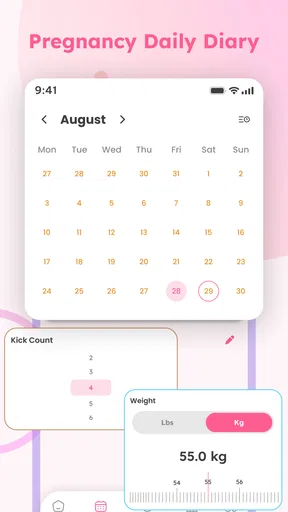
- Kick Counter: Keep track of your baby’s movements with ease. It’s reassuring to have this log handy, especially when you’re worrying about the little one’s activity.
- Contraction Timer: This is a lifesaver when you’re nearing the end of your pregnancy. Timing contractions is as easy as tapping a button, and it helps you determine when it’s time to head to the hospital.
- Growth Tracker: Once your baby is born, the app continues to be useful. You can log everything from feedings to diaper changes, ensuring you never miss a beat.
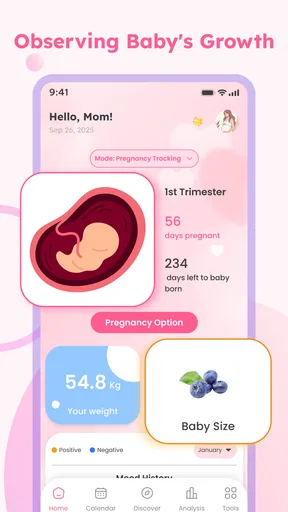
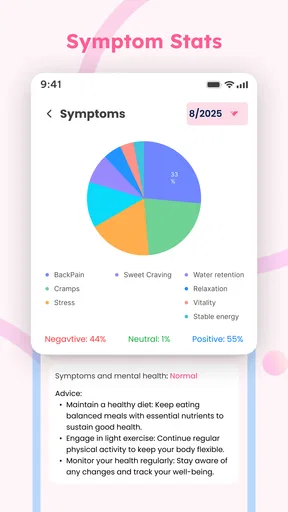
- Health and Fitness: Track your own health stats, like weight gain and mood changes. It’s a nice touch that reminds us parents to take care of ourselves too.
Alternatives, expectations, and fit
Compared with keeping notes in a general-purpose notes app, a dedicated baby tracker is appealing when pregnancy and newborn tasks are the focus: the relevant tools are grouped rather than mixed in with shopping lists, work reminders, and unrelated messages. A paper notebook, on the other hand, needs no phone and can be easier to share at an appointment. I would choose based on the habit I can actually maintain, not on the number of tools an app appears to offer.
Baby Tracker - Pregnancy Care is aimed at people who want pregnancy and early-care routines in one place, including those interested in an ovulation tracker as well as a contraction timer. It may be less suitable if you only want one narrow function, dislike entering personal information on a phone, or already have a reliable system shared with your care team. In those cases, a simple timer, paper log, or clinician-recommended method may be a better fit.
One non-obvious way to make a combined tracker less overwhelming is to choose a “minimum useful log” before the baby arrives. For instance, decide which few details would help you answer a real question later, such as whether a pattern is changing or what to mention at a check-in. That keeps the app from turning ordinary care into a stream of data entry. You can expand the routine only if those records prove useful to you.
Who it suits, and what to check first
The app is free, rated for Everyone, and developed by NEPTUN EXPRESS INC. It has a 4.5 average from around 2.3 thousand ratings and over 1 million installs, which suggests it has reached a broad audience, though popularity alone cannot tell me whether its workflow will suit my household. It was released on January 12, 2026, and version 1.0.3 is listed for devices running Android 9 or later. I would check compatibility on the device I plan to use, especially if it is an older phone.
That release timing is also a reason to keep expectations grounded: I would judge the app by the tasks I can use confidently today, not assume every possible parenting workflow is already covered. Before making it part of a shared routine, I would try the most important tracker and see whether its controls are clear to the other caregiver too. A tool that only one tired parent knows how to use is less helpful than a simpler routine both people can follow.
Easy Navigation and User Experience
What really stood out to me is how intuitive the app feels. The developers clearly put a lot of thought into making it user-friendly. Whether you’re tech-savvy or not, you’ll find that navigating through the features is straightforward. The app’s design is simple but effective, with everything you need just a tap away.
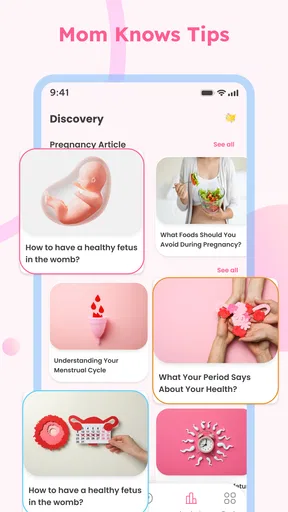
I also appreciate the little extras the app offers, like educational content and tips right at your fingertips. Whether it's advice on what to pack for the hospital or reminders about upcoming medical appointments, it’s like having a mini library in your hand.
Why You Should Download It
If you’re expecting or have a newborn, Baby Tracker - Pregnancy Care is a must-have. It’s more than just a tracker; it’s a comprehensive tool that helps you stay organized and informed during one of the most exciting times of your life. Trust me, with everything that’s going on, having a little help makes a world of difference.
In conclusion, this app is a gem for any parent wanting to ensure they’re on top of everything. It’s packed with features, easy to use, and genuinely helpful. So if you’re looking for an app to support you through pregnancy and beyond, give Baby Tracker - Pregnancy Care a try. You won’t regret it!
My connectivity verdict
I see this as a convenient organizer when my phone is close by and my connection is behaving, not as something I would make the sole home for important health information. For quick tracking, having pregnancy tools and early baby-care records together can make everyday handoffs easier. For urgent decisions, formal records, or situations where the phone may be unavailable, I would keep a dependable backup and follow professional guidance.
My recommendation is to try it with a modest routine: pick one tracker, use it in an ordinary day, and see whether it genuinely saves effort. If it does, add another task only when there is a clear reason. That approach makes the app more likely to support family life instead of adding another obligation, and it gives you a realistic sense of whether its connected, phone-based format fits the way you actually care for your baby.
Pros
- User-friendly interface for easy navigation.
- Comprehensive tracking of pregnancy milestones.
- Customizable reminders for prenatal appointments.
- Secure data storage with cloud backup.
- Integration with health monitoring devices.
Cons
- Limited features in the free version.
- Some users report occasional app crashes.
- In-app ads can be intrusive at times.
- Requires a stable internet connection.
- Some features locked behind a paywall.
FAQs for Baby Tracker - Pregnancy Care
What features does Baby Tracker - Pregnancy Care offer?
Baby Tracker - Pregnancy Care provides a comprehensive set of features to assist expectant parents. These include daily health tips, a contraction timer, a kick counter, and a comprehensive pregnancy checklist. The app also offers a journal for recording personal milestones and the ability to track prenatal appointments and symptoms.
Is Baby Tracker - Pregnancy Care available on both Android and iOS?
Yes, Baby Tracker - Pregnancy Care is available for download on both Android and iOS platforms. Users can find the app in the Google Play Store for Android devices and the Apple App Store for iOS devices, ensuring wide accessibility for all expecting parents.
Does the app provide educational content for first-time parents?
Absolutely. Baby Tracker - Pregnancy Care includes an extensive library of articles and guides tailored for first-time parents. These resources cover a wide range of topics, from prenatal nutrition and exercise to labor and delivery. The app aims to educate and empower parents throughout their pregnancy journey.
Are there any in-app purchases or subscriptions required?
While Baby Tracker - Pregnancy Care is free to download, it does offer optional in-app purchases. These purchases can unlock additional features, such as personalized health insights and advanced tracking tools. However, the core functionalities of the app are accessible without any subscription, making it user-friendly.
How accurate are the tracking features in the app?
The tracking features in Baby Tracker - Pregnancy Care are designed to be highly accurate and reliable. The app uses scientifically-backed algorithms and user data to provide precise tracking for aspects like contractions and fetal movements. However, it is always recommended to consult with healthcare professionals for medical advice.


